


พอดีลอง uv install package alembic ตัวจัดการ schema db แบบ dotnet ef / flyway แล้วที่นี้เวลา Run Command จะเจอ Error
PS D:\fastfinapi> alembic init -t async alembic
alembic : The term 'alembic' is not recognized as the name of a cmdlet, function, script file, or operable program. Check the spelling of the name, or if a path was included,
verify that the path is correct and try again.
At line:1 char:1
+ alembic init -t async alembic
+ ~~~~~~~
    + CategoryInfo          : ObjectNotFound: (alembic:String) [], CommandNotFoundException
    + FullyQualifiedErrorId : CommandNotFoundException

PS D:\fastfinapi> uv pip tree
alembic v1.17.2
├── mako v1.3.10
│   └── markupsafe v3.0.3
├── sqlalchemy v2.0.45
สำหรับทางแก้ activate มันซะ ปกติแล้ว uv มันเอา venv เข้ามาด้วย ดังนั้นเราสามารถ active มันได้เลยนะ
PS D:\fastfinapi> .\.venv\Scripts\activate.ps1
ตัวอย่างเป็นของ Windows แต่เค้าเตรียมให้ทุกค่ายเลย
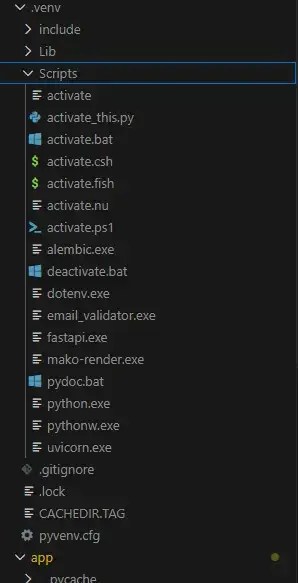
จากนั้นลองรัน สำเร็จครับ
(fastfinapi) PS D:\fastfinapi> alembic init -t async alembic
Creating directory D:\fastfinapi\alembic ...  done
Creating directory D:\fastfinapi\alembic\versions ...  done
Generating D:\fastfinapi\alembic.ini ...  done
Generating D:\fastfinapi\alembic\env.py ...  done
Generating D:\fastfinapi\alembic\README ...  done
Generating D:\fastfinapi\alembic\script.py.mako ...  done
Please edit configuration/connection/logging settings in D:\fastfinapi\alembic.ini before proceeding.
(fastfinapi) PS D:\fastfinapi>
ของ macOS / Linux ก็ source ./.venv/bin/activate


