
ถึง VB6 เป็นเทคโนโลยีที่เก่า ล้าสมัยไปแล้ว แต่อย่าลืมว่าระบบงานบางระบบยังคงใช้ภาษานี้อยู่ ซึ่งการปรับเปลี่ยน หรือ Port ไปทั้งระบบ อาจจะมีค่าใช้จ่ายที่สูง ทางที่ดีที่สุด คือ พัฒนาส่วนเสริมให้มันต่อไปเรื่อยๆ วันนี้ผมจะมาแนะนำการ Validate ข้อมูลโดยใช้ Regular Expression (ตกใจหละซิ เพราะหลายคนคิดว่ามันน่าจะมีใน Java / C# กัน) โดยผมจะแนะนำขั้นตอนการทำ โดยใช้ตัวอย่างของการนำ Regular Expression มาหา IP Address ที่อยู่ในช้อความ ตามขั้นตอน ดังนี้
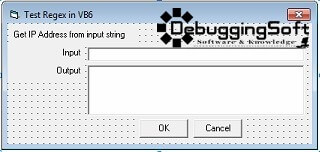
- เริ่มวางหน้าจอโปรแกรม ดังรูป
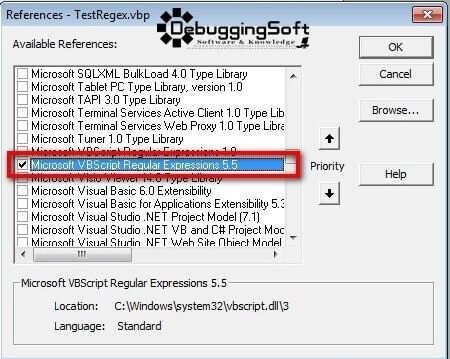
- จัดการ Add Reference
สิ่งที่ควรู้รู้ก่อนดูตัวอย่าง Code การใช้งาน
- Microsoft vbscript regular expressions 5.5 เป็น Library ที่ทาง Microsoft พัฒนา เพื่อช่วยให้การเขียน Regular Expression ง่ายขึ้น
- RegExp เป็น Object ที่มีหน้าที่จัดการกับ Regular Expression โดยมีสิ่งที่ควรรู้ดังนี้
- Pattern คือ Property ที่ให้ระบุตัว Regular Expression ที่ต้องการหาลงไป
- IgnoreCase คือ Property ที่เป็นไว้บอกรู้แบบการตรวจว่าต้องสนใจ ตัวอักษรเล็กใหญ่ หรือไม่ (ถ้า True = ไม่สนใจ)
- Test คือ Method ที่จะตรวจสอบคร่าวๆก่อนว่า Pattern ที่กำหนดเข้ามาถูกต้อง หรือไม่
- Execute คือ Method ที่สั่งให้ตรวจหาคำที่ตรงตาม Pattern ที่กำหนดไว้ ซึ่งได้ Output ในรูปแบบของ Object MatchCollection อาจจะได้คำที่ตรงตาม Pattern มากกว่า 1 คำ จึงต้องแยกออกมาทีละคำ โดยใช้ For Each ดึงออกมาใส่ Object Match แล้วจึงเอาผลลัพธ์ที่ได้ออกมาผ่านทาง Property Value
ตัวอย่าง Code การใช้งาน
Private Sub cmdOK_Click()
    Dim lStrIPPattern As String
    Dim lStrInput As String
    Dim lStrOutput As String

    lStrIPPattern = "([0-9]{1,3})\.([0-9]{1,3})\.([0-9]{1,3})\.[0-9]{1,3}"
    If txtInput.Text <> Empty Then
        lStrInput = txtInput.Text
        'Call Function TestRegExp
        lStrOutput = TestRegExp(lStrIPPattern, lStrInput)
        If lStrOutput <> Empty Then
            MsgBox "Pattern found!!!", vbOKOnly + vbInformation, "System Message"
            txtOutput.Text = lStrOutput
        Else
            MsgBox "Pattern not found!!!", vbOKOnly + vbExclamation, "System Message"
            txtOutput.Text = "Regular expression matching fail"
        End If
    Else
        MsgBox "Please enter input text", vbOKOnly + vbExclamation, "System Message"
    End If
End Sub

Private Function TestRegExp(pStrPattern As String, pStrInput As String) As String
    'Create objects.
    Dim lObjRegExp As RegExp
    Dim lObjMatch As Match
    Dim lColMatches As MatchCollection
    Dim lStrMatch As String

    'Create a regular expression object.
    Set lObjRegExp = New RegExp

    'Set the pattern by using the Pattern property.
    lObjRegExp.Pattern = pStrPattern

    'Set Case Insensitivity.
    lObjRegExp.IgnoreCase = True

    'Set global applicability.
    lObjRegExp.Global = True

    'Test whether the String can be compared.
    If (lObjRegExp.Test(pStrInput) = True) Then
        'Get the matches.
        Set lColMatches = lObjRegExp.Execute(pStrInput)   ' Execute search.

        For Each lObjMatch In lColMatches   ' Iterate Matches collection.
            lStrMatch = lStrMatch & "Match found at position "
            lStrMatch = lStrMatch & lObjMatch.FirstIndex & vbCrLf
            lStrMatch = lStrMatch & "===== Match Value is ==== " & vbCrLf
            lStrMatch = lStrMatch & lObjMatch.Value & vbCrLf
        Next
    Else
        lStrMatch = Empty
    End If
    'Return Result
    TestRegExp = lStrMatch
End Function
ผลการทำงาน
- กรณีที่พบข้อมูลตรงตาม Pattern โปรแกรมแสดงคำที่พบ ดังรูป
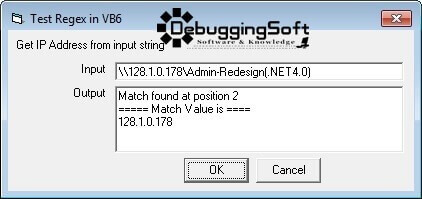
- กรณีที่ไม่พบข้อมูลตาม Pattern โปรแกรมแสดง Message ดังรูป
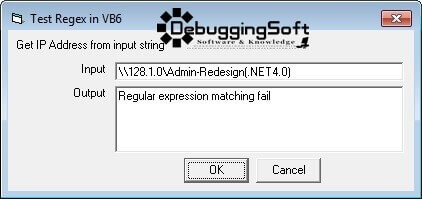
Download ตัวอย่าง Source Code
แหล่งข้อมูล
- http://www.experts-exchange.com/Programming/Languages/Visual_Basic/A_1336-Using-Regular-Expressions-in-Visual-Basic-for-Applications-and-Visual-Basic-6.html
- http://www.experts-exchange.com/Programming/Languages/Visual_Basic/A_1336-Using-Regular-Expressions-in-Visual-Basic-for-Applications-and-Visual-Basic-6.html
- http://www.addedbytes.com/blog/code/vbscript-regular-expressions/
- http://www.regular-expressions.info/vb.html
Discover more from naiwaen@DebuggingSoft
Subscribe to get the latest posts sent to your email.