


Today I'm writing up a recap as a KM note about the issue: "Windows could not start the OpenSSH SSH Server service on Local Computer (Error 1067)."
This is a bug in Windows caused by a Microsoft Windows Update itself, which breaks the service's permissions. You can fix it by
- following the steps in this KM https://learn.microsoft.com/en-us/troubleshoot/windows-server/system-management-components/error-1053-1067-7034-after-update-openssh-doesnt-start
- using the script I've prepared.
# limit ssh folder permissions to full control for system and local group administrators, and read for authenticated users
$directoryPath = "$env:ProgramData\ssh"
$acl = Get-Acl -Path $directoryPath
$sddlString = “O:BAD:PAI(A;OICI;FA;;;SY)(A;OICI;FA;;;BA)(A;OICI;0x1200a9;;;AU)”
$securityDescriptor = New-Object System.Security.AccessControl.RawSecurityDescriptor $sddlString
$acl.SetSecurityDescriptorSddlForm($securityDescriptor.GetSddlForm("All"))
Set-Acl -Path $directoryPath -AclObject $acl

# limit log folder permissions to full control for system and local group administrators, and read for authenticated users
$directoryPath = "$env:ProgramData\ssh\logs"
$acl = Get-Acl -Path $directoryPath
$sddlString = “O:BAD:PAI(A;OICI;FA;;;SY)(A;OICI;FA;;;BA)(A;OICI;0x1200a9;;;AU)”
$securityDescriptor = New-Object System.Security.AccessControl.RawSecurityDescriptor $sddlString
$acl.SetSecurityDescriptorSddlForm($securityDescriptor.GetSddlForm("All"))
Set-Acl -Path $directoryPath -AclObject $acl
Also check the user account that runs the service. Normally, it should be a Local System Account as shown in the screenshot.
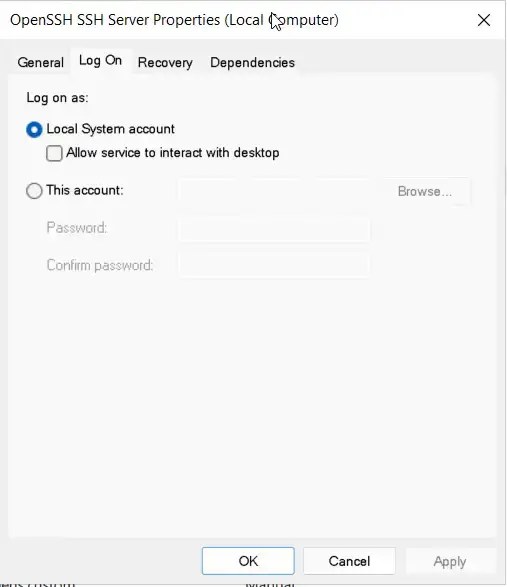
, or by using the command.
sc.exe config sshd obj= "LocalSystem" start= auto
Reference
- https://learn.microsoft.com/en-us/troubleshoot/windows-server/system-management-components/error-1053-1067-7034-after-update-openssh-doesnt-start
- https://github.com/PowerShell/Win32-OpenSSH/issues/2290
- https://github.com/PowerShell/Win32-OpenSSH/issues/2287
- https://blog.csdn.net/zhouhoulong/article/details/143228579


