


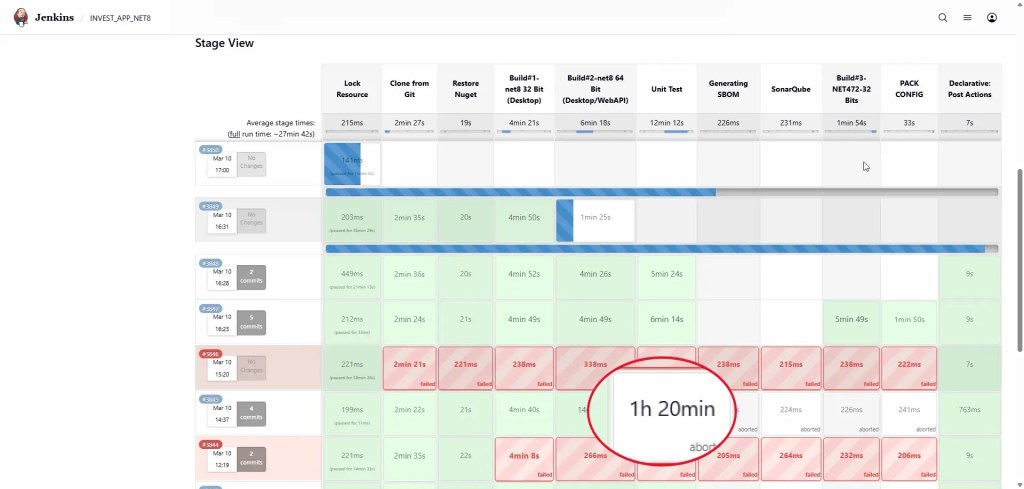
วันนี้ไปส่องใน Grafana แล้วพบว่า มี Build อันนี้ ใช้เวลา Run ผิดปกติ
เลยไปส่องดู Code ถ้าใหมาแบบนี้ Jenkins มันทำงานไปเรื่อยๆ จนถึง Timeout ที่ตั้งไว้แน่ๆ แล้วอาจจะมีประเด็นขอ Waive Test ได้เพราะนาน
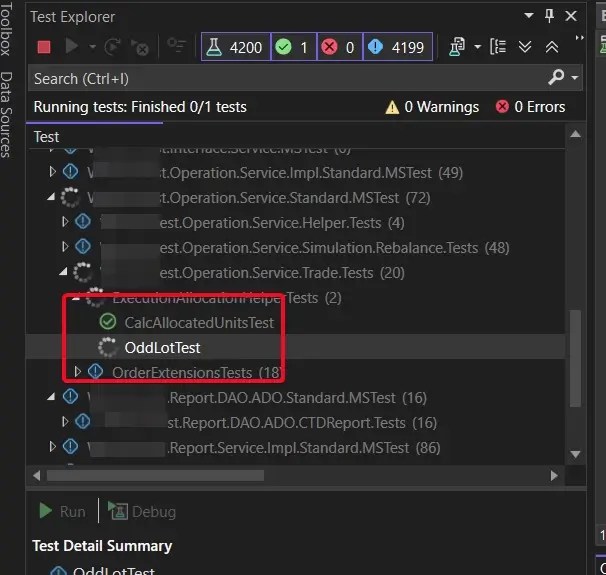
หลังจากลอง Pull Code แล้วลอง Run Test ดูก็พบว่า Test แมร่ง Run ค้างไปเรื่อยๆ 10 นาที ยังไม่หยุดครับ เลยต้องเข้าไปดู Code
public static IList<T> OddLot<T>(IList<T> allocatedUnits, decimal oddLot, decimal? pRoundingBy) where T : ExecutionAllocationCommonDTO
{
	// N + 1 Lot
	int nLot = Math.Abs((int)(oddLot / pRoundingBy.Value)) + 1;

	//Odd lot
	int nOrder = allocatedUnits.Count;
	int nZeroOrder = allocatedUnits.Where(p => p.AllocatedUnit == 0.0m).Count();
	if (nOrder == 0) return allocatedUnits;

	decimal remainingLot = Math.Abs(oddLot);
	while (remainingLot != 0)
	{
		decimal addOrDeductValue = remainingLot >= pRoundingBy.Value ? pRoundingBy.Value : remainingLot;

		/*
		  In the case where the allotment is not yet complete
		, the remaining Lots must be gradually assigned to Orders starting from the first to the last
		, as much as possible, in order.
		  In the case where the allotment exceeds the amount, it must be processed from bottom to top.
		*/
		for (int i = 0; i < nLot; i++)
		{
			IList<decimal> maxAllocatedUnit = allocatedUnits.OrderByDescending(o => o.AllocatedUnit).Select(p => p.AllocatedUnit).ToList() as IList<decimal>;
			decimal firstMaxAllocatedUnit = maxAllocatedUnit.FirstOrDefault();
			if (firstMaxAllocatedUnit == allocatedUnits[i].AllocatedUnit)
			{
				//Add
				if (oddLot > 0)
				{
					allocatedUnits[i].AllocatedUnit = allocatedUnits[i].AllocatedUnit + addOrDeductValue;
				}
				//Deduct
				else
				{
					allocatedUnits[i].AllocatedUnit = allocatedUnits[i].AllocatedUnit - addOrDeductValue;
				}
				remainingLot -= pRoundingBy.Value;
				break;
			}
		}
	}
	return allocatedUnits;
}
จาก Code ข้างต้น เราพบว่า Line ที่ 12 มันมีปัญหา while (remainingLot != 0) ถ้าตัวเลขจากที่ตั้งต้น แล้วตัด Lot แล้วดันติดลบขึ้นมา มันจะ Infinite Loop ครับ
หากเคสนี้หลุดไป Production App / Web ขึ้นมา อาจจะทำให้เกิด Bug ที่ตรวจจับสาเหตุได้ยาก เช่น กดแล้ว App ปิดตัวลง หรือ เว็บตอบสนองช้าลง / ตัว Container OOMKilled เพราะ Resource ถูกใช้งานไปเรื่อยๆ จนหมด
การแก้ไข Code
ถ้าเอาง่ายๆ ผมปรับ while (remainingLot >= 0) แต่เพื่อให้งานของเรามีคุณภาพทั้งส่วน Technical และ Business ผมทำ Excel ให้ทาง BA หยอดเลขในเคสต่างๆแทนครับ จะได้ครบทั้ง Technical และ Business
และเพิ่ม Unit Test ตามที่ BA แนะนำ + Boundary จากมุมของ Dev เข้าไปประกบครับ
CI/CD - Improvement
สำหรับเรื่องนี้มันจะจุดแก้หลายจุดครับ ทั้งในส่วนของ Test Runner ของ Unit Test เอง เลยขอมา Recap ปกติผมกำหนด timeout(time: 30, unit: 'MINUTES') ใน jenkinsfile ไว้แล้ว
📌Test Runner ของ Unit Test อันนี้ผมสรุปของทั้ง MSTest / Nunit / XUnit และมีตัวใหม่อย่าง TUnit ด้วย กรณีกำหนดจาก Code Method/Class
- MSTest - กำหนดที่ระดับ Method
[TestMethod]
[Timeout(2000)] // 2 Second
public void Test_Method() { ... }
- NUnit - กำหนดที่ระดับ Method / Class
[Test]
[Timeout(2000)] // 2 Second
public void Test_Method() { ... }
[Fact(Timeout = 2000)] // 2 Second
public void Test_Method() { ... }
using TUnit.Core;
public class MyTests
{
    [Test]
    [Timeout(5000)] //5000ms
    public async Task Test_With_Milliseconds()
    {
        await Task.Delay(1000);
    }

    [Test]
    [Timeout(0, 0, 10)] //Set By TimeSpan (Hours, Minutes, Seconds) = 10 Sec
    public async Task Test_With_TimeSpan()
    {
        await Task.Delay(1000);
    }
}
📌และส่วน CI/CD
- dotnet - ในไฟล์ .runsettings เรากำหนด TestSessionTimeout เพื่อคุมให้ CI/CD เราไม่ได้ทำงานนานเกินไป
<RunSettings>
  <RunConfiguration>
    <!-- Max Test Session Time in milliseconds-->
    <TestSessionTimeout>60000</TestSessionTimeout>
  </RunConfiguration>
</RunSettings>
- Jenkins - ใช้ Plugin Timeout ช่วยได้
pipeline {
    agent any
    options {
        // Overall Job
        timeout(time: 30, unit: 'MINUTES')
    }
    stages {
        stage('Test') {
            steps {
                // Only this stage
                timeout(time: 10, unit: 'MINUTES') {
                    sh 'dotnet test --configuration Release'
                }
            }
        }
    }
}
- GitLab - timeout
test_job:
  stage: test
  script:
    - dotnet test --configuration Release
  timeout: 15m  # Max Duration of this task 15 minute
จบไปอีก Case - Good Design / Good Code Quality ครับ


