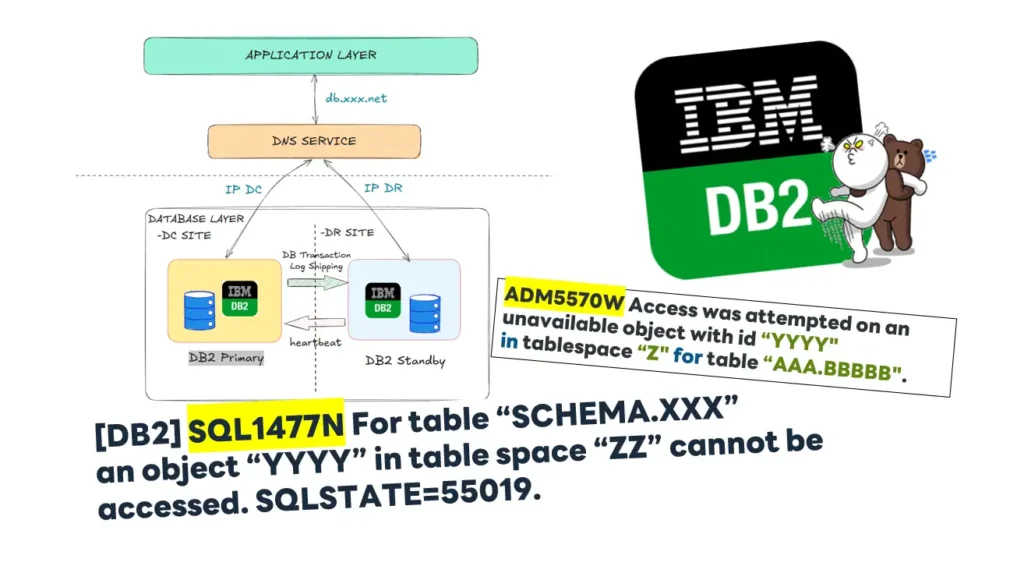

สำหรับอันนี้จด note ดีกว่า เนื่องจากว่าทดสอบ DRP แล้ว ตอนย้ายไป DR เรียบร้อยขา App dotnet ดับอนาถเลยครับ ตุยกันรัวๆ เลยมา Recap เผื่อมีคนเจอปัญหาของจาก DB ค่ายนี้ครับ
Table of Contents
Environment
Root Cause
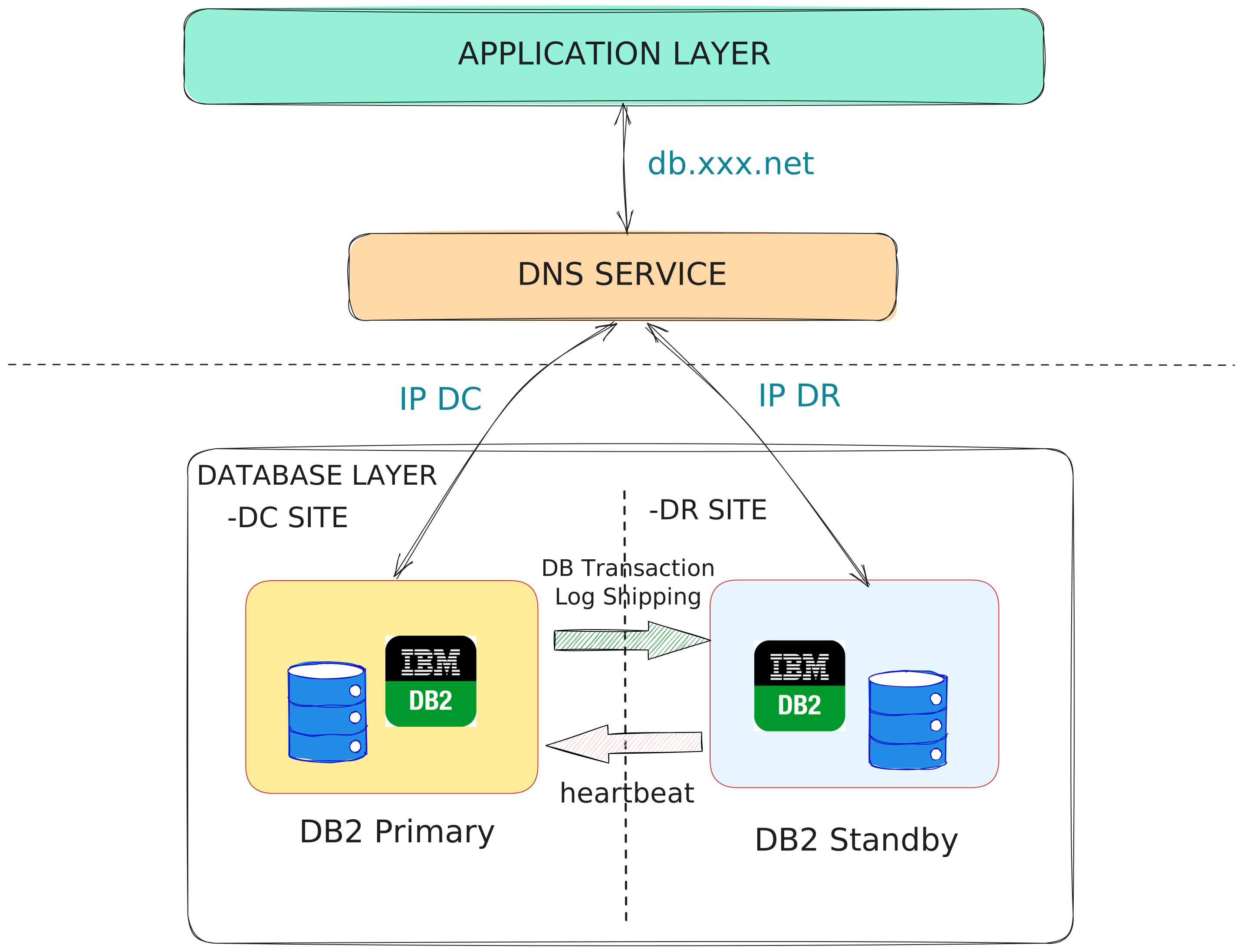
ปกติแล้ว Enviroment ที่ทำตัว db2 hadr ห้ามใช้คำสั่ง load หรือ copy command เพราะมันไม่ได้ทำพวก Transaction Log ไว้ ทำใน Database ขา Standby ไม่ มีข้อมูลครับ ดังนั้นตอน DB2 สั่ง failover ไปมันเลยแตก
ถ้าเราลองเอา diag.log ลองไล้ดึจะเจออีก Error นึงครับ
2026-01-02-20.58.08.607923+420 I861395E529           LEVEL: Error
PID     : 165759               TID : 140124939609856 PROC : db2sysc 0
INSTANCE: invsins1             NODE : 000            DB   : INVSDB
APPHDL  : 0-39188              APPID: *LOCAL.invsins1.250917135227
AUTHID  : INVSINS1             HOSTNAME: invsdrdb01
EDUID   : 121                  EDUNAME: db2agent (INVSDB) 0
FUNCTION: DB2 UDB, relation data serv, sqlrreorg_table, probe:600
DATA 01 : String, 56 bytes
Table Schema     : INVS
Table Name       : INVTRANS

...

2026-01-02-21.11.58.152810+420 E868741E858           LEVEL: Warning
PID     : 165759               TID : 140124482430720 PROC : db2sysc 0
INSTANCE: invsins1             NODE : 000            DB   : INVSDB
APPHDL  : 0-39025              APPID: 10.98.67.28.53651.250917134252
UOWID   : 40                   ACTID: 1
AUTHID  : INVADM               HOSTNAME: invsdrdb01
EDUID   : 166                  EDUNAME: db2agent (INVSDB) 0
FUNCTION: DB2 UDB, data management, sqldSetupSQLCA, probe:3
MESSAGE : ADM5570W  Access was attempted on an unavailable object with id "397"
          in tablespace "2" for table "INVS.INVTRANS".  If the object is a
          table it will have to be dropped.  If the object is a partition it
          will have to be detached. If the object is a non-partitioned index
          the index will have to be dropped.
ฝั่ง App จะ Error แนวนี้ Table แตกแล้ว
SQL1477N For table "SCHEMA.XXX" an object "YYYY" in table space "ZZ" cannot be accessed. SQLSTATE=55019.
ถ้าลองดู Doc ของ DB2 เอง หลังๆ IBM เค้าปิด Doc จาก Google สายฟรีที่ บ ไม่ได้จ่าย Subscription (งกไม่ยอมลงทุน ลูกค้าจ่ายหนักอยู่น้า) หรือ เป็น Partner ก็ต้องมาช่องทางนี้
[invsdba@invsprddb ~]$ db2 ? SQL1477N


SQL1477N  For table "<table-name>" an object "<object-id>" in table
      space "<tbspace-id>" cannot be accessed.

Explanation:

An attempt was made to access a table where one of its objects is not
accessible. The table may not be accessible because of one of the
following reasons:

*  The table had NOT LOGGED INITIALLY activated when the unit of work
   was rolled back.

*  The table is a partitioned created temporary table or declared
   temporary table and one or more database partitions failed since the
   temporary table was instantiated or declared.

*  ROLLFORWARD encountered the activation of NOT LOGGED INITIALLY on
   this table or a NONRECOVERABLE load on this table.

Access to this table is not allowed because its integrity cannot be
guaranteed.

User response:

One of the following actions can be taken.

*  If the object is a table and it had NOT LOGGED INITIALLY activated,
   drop the table. If this table is required, re-create it.

*  If the object is a data partition, detach it from the table. If this
   data partition is required, add a new one.

*  If the object is a non-partitioned index, drop the index. If this
   index is required, create a new one.

*  If the table is a created temporary table, disconnect from the server
   and connect again to instantiate a new copy of the created temporary
   table.

*  If the table is a declared temporary table, drop the table. If this
   table is required, declare it again.

*  Otherwise, restore from a table space or database backup. The backup
   image must have been taken subsequent to the commit point following
   the completion of the non-recoverable operation (NOT LOGGED INITIALLY
   operation, or NONRECOVERABLE load).

The catalogs and administrative views can be used to determine what the
object is. To determine if the object is a table, use the following
query:

SELECT TABNAME
  FROM SYSCAT.TABLES
  WHERE TBSPACEID="<tbspace-id>" AND
    TABLEID="<object-id>"


If a table name does not appear as the result for this query you can
determine if the object is a partition by using the following query:

SELECT DATAPARTITIONNAME, TABNAME
  FROM SYSCAT.DATAPARTITIONS
  WHERE TBSPACEID="<tbspace-id>" AND
    PARTITIONOBJECTID="<object-id>"


To determine if the object is an index, use the following query:

SELECT INDNAME
  FROM SYSCAT.INDEXES
  WHERE TBSPACEID="<tbspace-id>" AND
    INDEX_OBJECTID="<object-id>"


To determine if the object is a created temporary table or a declared
temporary table, use the following query:

SELECT TABNAME
 FROM SYSIBMADM.ADMINTEMPTABLES
 WHERE TBSP_ID="<tbspace-id>" AND
  INDEX_TAB_FILE_ID="<object-id>"


sqlcode: -1477

sqlstate: 55019


   Related information:
   ADMINTEMPTABLES administrative view and ADMIN_GET_TEMP_TABLES table
   function - Retrieve information for temporary tables
ถ้าจาก doc ของ DB2 เองมันบอกว่า สาเหตุที่เป็นไปได้
📌 The table had NOT LOGGED INITIALLY activated when the unit of work was rolled back.
- ตอนสร้าง Table ไปกำหนดค่าเพิ่ม NOT LOGGED INITIALLY ปกติ เหมือนเป็นตารางทดตอนทำ Process ตัวอย่าง แบบนี้
CREATE TABLE rpt_products (
    productID      INT,
    product_Name   VARCHAR(30)
    ...
)
NOT LOGGED INITIALLY;
- มันจะไม่ลง Transaction Log ให้ เวลาทำ HADR เลยไม่มี Log เวลา Unit Of Work (TX) Fail มันจะ Recover ไม่ได้
📌 The table is a partitioned created temporary table or declared temporary table and one or more database partitions failed since the temporary table was instantiated or declared.
- temporary table - CREATE GLOBAL TEMPORARY TABLE อารมณ์เหมือน Table ที่เราจัดการได้ตาม Session นั้นๆเลย
- แล้วที่นี้ พื้นที่บางส่วนมันพัง อาจจะเพราะ Load หรือ อะไรที่ไม่มี Tx Log
📌 ROLLFORWARD encountered the activation of NOT LOGGED INITIALLY on
this table or a NONRECOVERABLE load on this table.
- Table NOT LOGGED INITIALLY แล้วดัน ROLLFORWARD เกิดขึ้น (Replay ข้อมูลตาม Log
- หรือ Table ที่ถูก Load เข้าไป คำสั่งนี้มันไม่เก็บ Tx Log อยู่แล้ว ดังนั้น Table พังแน่นนอน นอกจากมีเงินลงทุน เช่น พวก TSM (Tivoli Storage Manager) หรือ NFS (Network File System) แล้วให้ 2 ตัวนี้มันปั๊นของไปวางที่ Standby ให้ แต่ต้องมีเงิน
ลองอ่านเพิ่มเติมได้จาก Load operations and HADR แต่เอาจริงๆ ผมว่าไม่จำเป็นอย่าใช้ มันมีเงื่อนอีกอีกแบบว่าต้องซื้อของเพิ่มนะ
อ๋อ และต้องระวังด้วย ถ้า DC Failover ไป DR แล้ว DR เจอปัญหา SQL1477N ถ้า Failover กลับมา DC พวก Table หรือ Table Space อาจจะ REORG / RUNSTATE เป็นช่วงๆ อารมณ์แบบมันคิดว่า DR ส่งอะไรกลับมานี่แหละ อย่าลืมไปปิดมันก่อนนะ
How to Fixed
Sol1: Reinitialize the HADR standby(s) with the backup image of the primary database เอาง่ายๆ
- ทำที่ DC ให้เรียบร้อย จะ db2 load dump ข้อมูลอะไร
- backup db จาก DC แล้ว scp โยนไปที่ DR
- และจัดการผูก HADR ใหม่ครับ
Sol2: db2dart เอาข้อมูล table ที่พังออกมา และ db2look สร้าง Table ขึ้นมาใหม่ ซ่อมที่ DR จากนั้นค่อย Sync HADR อีกรอบ
- เอา Schema เดิมออกมา หรือ ถ้ามี Script ไว้ข้ามไปได้เลย
db2look –d <dbname> –e –z <schema_name> –t <table_name> -o <output_file>
- db2dart -
DB2DART database-name /DDEL
- หลังพิมพ์ต้องป้อน table space id object IDs มันบอกใน SQL1477N / ADM5571W และกำหนด page ค่าแรกใส่ 0 แต่ค่า max อันนี้ต้อง Query ดู หรือ ใส่เยอะๆไป
- พอได้ไฟล์มาต้อง DROP Table สร้าง Table ใหม่ ไฟล์ที่ได้ DB2DART มาทำ db2 import / load คืนเข้าไป
How to Prevent
- Monitor By SQL
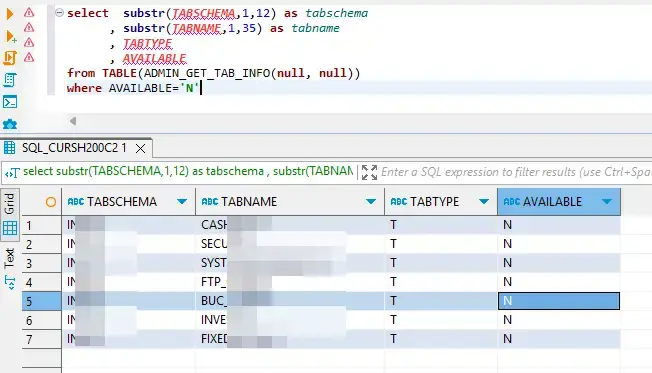
📌 ถ้า Standby Database เปิด Feature Read On Standby ไว้ อาจจะทำ Job เพื่อ Run Query ตรวจสอบ ว่า table ไหนพังไปแล้ว ดึงข้อมูลจาก ADMIN_GET_TAB_INFO
select  substr(TABSCHEMA,1,12) as tabschema
      , substr(TABNAME,1,35) as tabname
      , TABTYPE
      , AVAILABLE
from TABLE(ADMIN_GET_TAB_INFO(null, null))
 where AVAILABLE='N'
📌 ตัวอย่างผลลัพธ์ ประมาณนี้ครับ
- Monitor By db2dart
db2dart - Database analysis and reporting tool ซึ่งเต็มมัน เป็น Tools ที่ช่วยตรวจสอบ Table ได้เหมือนกัน นอกจากตอนแรกที่เราเอามาซ่อม DB แล้ว การใช้งาน
- ดูทั้ง Database เลย
db2dart MYDB /TS /QCK
- จะดูตาม Table Space Id ก็ได้
db2dart MYDB /TS /TSI 15 /QCK
ตอนนี้พอได้ Idea เอาไปผูกกับระบบ Monitor ต่างๆแล้วครับ จะเอาไปดูกับ Tools Monitor หรือ เขียน Bash ส่งเมล์เอาก็ได้ครับ
- HADR CFG BLOCKNONLOGGED = YES
UPDATE DB CFG FOR USING BLOCKNONLOGGED YES
คำสั่งนี้จะให้ตัว DB2 ตรวจพวก SQL แบบที่มีพวก NOT LOGGED INITIALLY แต่ถ้าเป็นพวก CLOB, DBCLOB, BLOB column มันเป็นกลุ่ม not logged ถ้า Table มี Column แบบนี้ต้องรื้อก่อน
สุดท้าย
ถ้าเป็นผมที่มาจากสาย Dev ถ้าต้อง Load ข้อมูล ผมยอมตัด HADR ออกก่อน แล้วค่อย Backup Restore ที่ Standby + ผูก HADR ใหม่ (ปล DB ผมขนาดไม่ถึง 500 GB)
หาก DB ใหญ่กว่านี้ ควรยอมลงทุนพวก NFS / หรือ TSM
แต่ถ้ามีงานที่ต้องใช้ load (อยากเร็ว) และไม่อยากให้ DR พัง รวมถึงเรามี commvault license ลองทำกันได้ คำสั่งประมาณนี้ ใช้ C Lib ของ Commvalut แอบทำให้ DR มี Log
db2 "load from /home/db2inst2/emp1.del of del replace into empcopy copy yes load '/opt/commvault/Base/libDb2Sbt.so'"
ถ้าสนใจลองอ่านเพิ่มเติม เพื่อของงบได้ครับ 555
สุดท้ายทำ HADR แล้ว อย่าซ่าไปใช้ db2 load ไปใน ทางที่มันสร้าง Tx Log นะ
Reference
- Avoiding Inoperative Tables on the HADR Standby – DataGeek.blog
- https://documentation.commvault.com/2024e/commcell-console/load_copy_operations_in_db2_hadr_environment.html
- Configuring for high availability
- https://ibm.github.io/db2-hadr-wiki/faq.html#How_is_LOAD_handled_by_HADR_
- คู่มือ db2dart DB2DART Hints & Tips for the DBA
- blocknonlogged - Block creation of tables that allow non-logged activity configuration parameter
Discover more from naiwaen@DebuggingSoft
Subscribe to get the latest posts sent to your email.