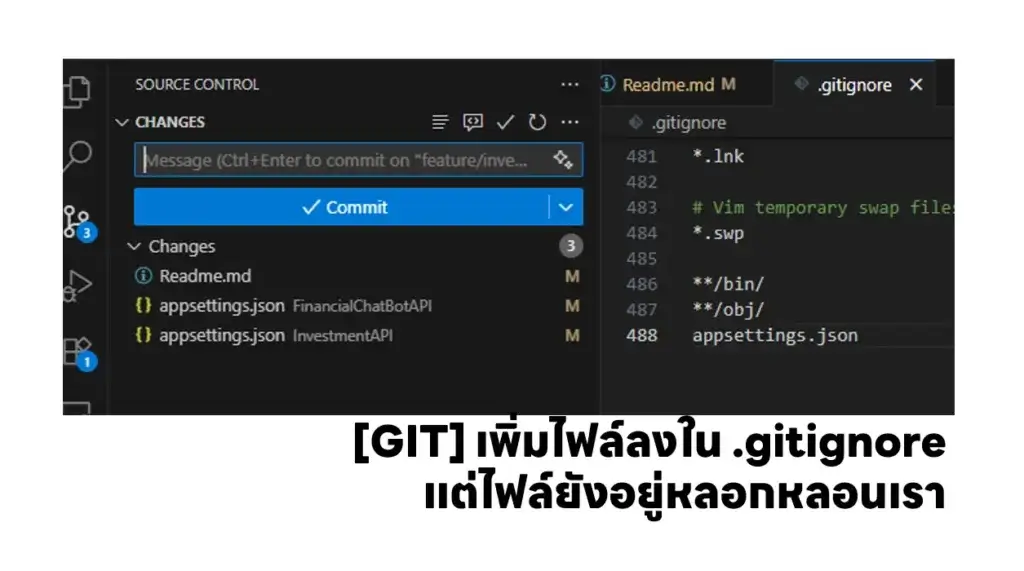

ช่วงนี้ทำ Side Project อยู่นี่แหละ แล้วที่นึกได้ว่ามีไฟล์มันไม่จำเป็นต้อง Commit เลยเพิ่มใน .gitignore แต่มันก็ยังให้ Commit อยู่
สงสัยตั้งชื่อผิด หรือ ป่าว ?
ไม่น่าจะผิดนะ มีครบตามรูป Cover เลย
วิธีแก้
เลยลองหา Google หาดูสรุป
- ต้อง Remove จาก Git Cache
--Usage
git rm --cached <Path to File>
git rm --cached -r <Path to Folder>

--Example
git rm --cached \InvestmentAPI\appsettings.json
- และ Commit ทับไปอีกรอบ
git commit -m "Ignore appsettings.json"
จากนั้น push ขึ้นไป จบไฟล์ appsettings.json ไม่หลอนให้ Commit แม้ว่าจะกำหนดใน .gitignore เรียบร้อยแล้วครับ สำหรับผมแล้วในเคสนี้แยก appsettings.example.json เอาไว้ อธิบายให้คนใช้งานต่อครับ
อ๋อ แล้วก็ ถ้ามี Secret ไว้ในนั้นเอา BFG Repo Cleaner เอาออกอีกทีครับ มี Blog นะ
Discover more from naiwaen@DebuggingSoft
Subscribe to get the latest posts sent to your email.