public async Task<JsonDocument> AnalyzeDocumentAsync(Stream documentStream)
{
    HttpRequestMessage analyzeRequest = new HttpRequestMessage
    {
        Method = HttpMethod.Post,
        RequestUri = new Uri(
            $"{_endpoint}/formrecognizer/documentModels/prebuilt-receipt:analyze?api-version={_apiversion}"
        ),
        Content = new StreamContent(documentStream)
    };

    analyzeRequest.Headers.Add("Ocp-Apim-Subscription-Key", _apiKey);
    analyzeRequest.Content.Headers.ContentType = new MediaTypeHeaderValue("application/pdf");

    HttpResponseMessage analyzeResponse = await _httpClient.SendAsync(analyzeRequest);

    // Check if the response is successful
    analyzeResponse.EnsureSuccessStatusCode();

    if (!analyzeResponse.Headers.Contains("apim-request-id"))
    {
        throw new InvalidOperationException(
            "Response does not contain the header 'apim-request-id'."
        );
    }

    string requestId = analyzeResponse.Headers.GetValues("apim-request-id").FirstOrDefault() ?? string.Empty;

    //===============================================================
    string status = "running";
    JsonDocument result = null;
    while (status == "running" || status == "notStarted")
    {
        HttpRequestMessage resultRequest = new HttpRequestMessage
        {
            Method = HttpMethod.Get,
            RequestUri = new Uri($"{_endpoint}/formrecognizer/documentModels/prebuilt-receipt/analyzeResults/{requestId}?api-version={_apiversion}")
        };
        resultRequest.Headers.Add("Ocp-Apim-Subscription-Key", _apiKey);

        HttpResponseMessage resultResponse = await _httpClient.SendAsync(resultRequest);
        resultResponse.EnsureSuccessStatusCode();

        String resultJson = await resultResponse.Content.ReadAsStringAsync();
        result = JsonDocument.Parse(resultJson);

        status = result.RootElement.GetProperty("status").GetString();

        if (status == "running")
        {
            // Wait for a specific interval before polling again
            await Task.Delay(TimeSpan.FromSeconds(1));
        }

        if (status == "failed")
        {
            throw new Exception("Document analysis failed.");
        }
    }

    if ((result != null) && (status == "succeeded"))
    {
        return result;
    }
    else
    {
        throw new Exception("Document analysis failed.");
    }
}
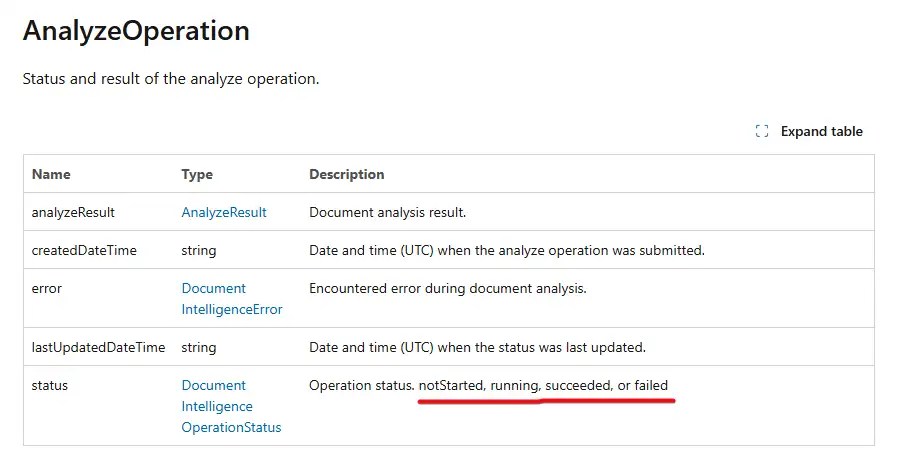
ที่นี้เราจะเห็นว่าผมมีดัก Status running / failed / succeeded อันนี้ผมไปดูจาก API Doc ของมัน ส่วน AnalyzeOperation
program.cs อันนี้ register service / controller ครับ
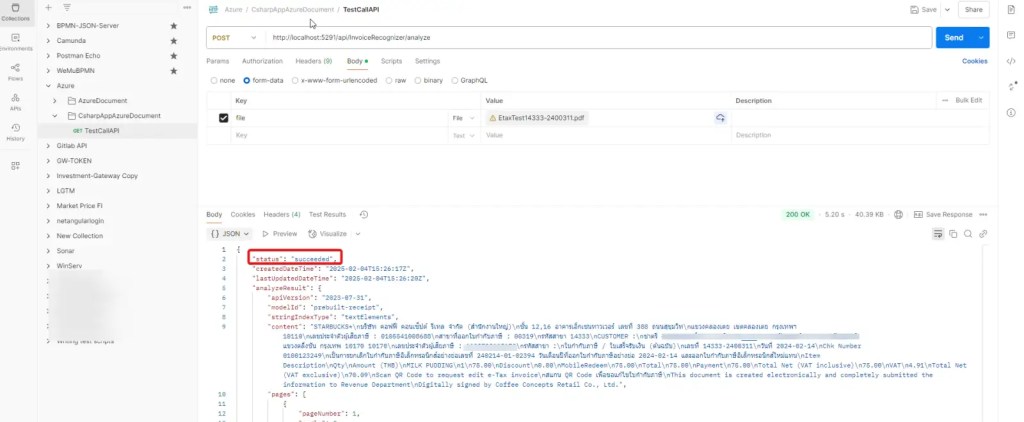
ลองยิง REST API ตอนนี้ผลลัพธ์ที่ได้จะมาเยอะๆ เหมือนกันที่ลองใน Blog ก่อนหน้า อันนี้ง่ายขึ้นด้วย ไม่ต้องมาแปลง base64 แล้ว กำหนด REST + เลือก Body เป็น From File ได้เลย
public async Task<ExtractReceiptDTO> ExtractReceipt(Stream documentStream)
{
    JsonDocument result = await AnalyzeDocumentAsync(documentStream);

    // Extract the documents property and count the number of documents
    JsonElement documents = result.RootElement.GetProperty("analyzeResult").GetProperty("documents");
    if (documents.GetArrayLength() == 0)
    {
        throw new Exception("Document analysis failed.");
    }

    //result.Documents can contain multiple documents, but we only get first one in this example
    JsonElement fields = result.RootElement
            .GetProperty("analyzeResult")
            .GetProperty("documents")[0].GetProperty("fields");

    // Extract the values
    string merchantName = fields.GetProperty("MerchantName").GetProperty("valueString").GetString();
    double total = fields.GetProperty("Total").GetProperty("valueNumber").GetDouble();
    double totalTax = fields.GetProperty("TotalTax").GetProperty("valueNumber").GetDouble();
    DateTime transactionDate = fields.GetProperty("TransactionDate").GetProperty("valueDate").GetDateTime();

    return new ExtractReceiptDTO
    {
        MerchantName = merchantName,
        Total = total,
        TotalTax = totalTax,
        TransactionDate = transactionDate
    };
}
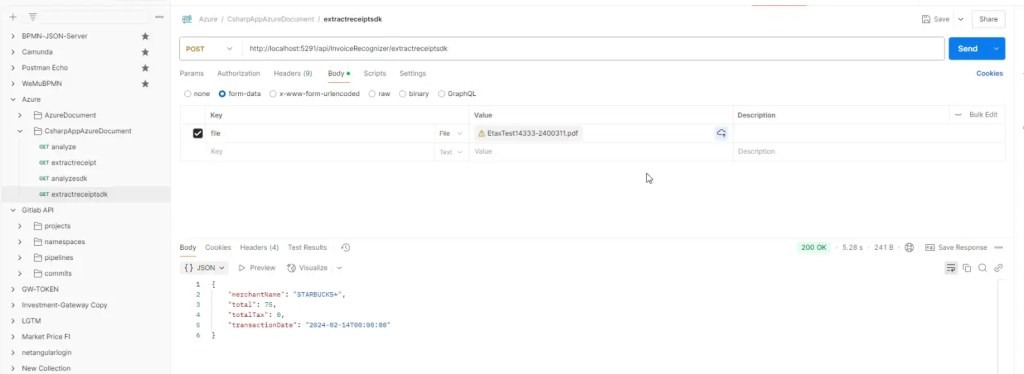
พอได้ตรงนี้แล้วหลายคนน่าจะมี Idea ทำต่อครับ อย่างผมเอาข้อมูลตรงนี้เก็บลง DB / Spreadsheet ทำข้อมูลสรุปได้แล้วครับ ผมทำใช้เองมาพักนึงเหมือนกันครับ เดี๋ยวค่อยมาเขียน Blog ขยายเรื่อยๆ ^__^