How to
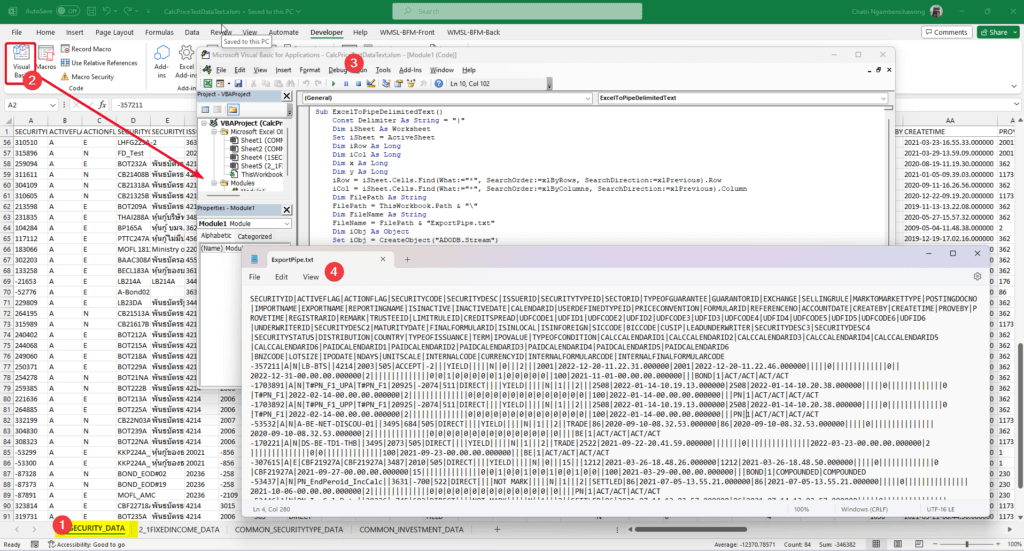
- Select Sheet
- Access VBA Project (ALT + F11)
- Add Module
- Tools > References: Add a reference to Microsoft VBScript Regular Expressions 5.5
- Paste Code and Run
Sub ExcelToPipeDelimitedText()
    Const Delimiter As String = "|"
    Dim iSheet As Worksheet
    Set iSheet = ActiveSheet
    Dim iRow As Long
    Dim iCol As Long
    Dim x As Long
    Dim y As Long
    iRow = iSheet.Cells.Find(What:="*", SearchOrder:=xlByRows, SearchDirection:=xlPrevious).Row
    iCol = iSheet.Cells.Find(What:="*", SearchOrder:=xlByColumns, SearchDirection:=xlPrevious).Column
    Dim FilePath As String
    FilePath = ThisWorkbook.Path & "\"
    Dim FileName As String
    FileName = FilePath & "ExportPipe.txt"
    Dim iObj As Object
    Set iObj = CreateObject("ADODB.Stream")
    iObj.Type = 2
    iObj.Charset = "unicode"
    iObj.Open
    Dim z() As Variant
    ReDim z(1 To iCol)
    For x = 1 To iRow
        For y = 1 To iCol
            'z(y) = Trim$(iSheet.Cells(x, y).Text)
            z(y) = Replace$(Trim$(iSheet.Cells(x, y).Text), vbTab, "")
        Next
        iObj.WriteText Join(z, Delimiter), 1
    Next
    iObj.SaveToFile FileName, 2
    Dim TextApp
    TextApp = Shell("C:\WINDOWS\notepad.exe " & FileName, 1)
End Sub
Full Snippet: VBA Convert Excel to Pipe Delimited File (github.com)
Next Blog will convert this VBA Code to OfficeJS or Python
Discover more from naiwaen@DebuggingSoft
Subscribe to get the latest posts sent to your email.