
สำหรับที่มาของ Script ชุดนี้นี่ทำ Team วุ่นวายเลย เรื่องก็มีอยู่ว่าเวลาพัฒนาระบบต่างๆมันมีในส่วนของ Source Code และ SQL Script ซึ่งต้องนำไป Run ใน Enviromemt ของ Test, Dev หรือ Production ก็ตาม แต่เพราะความสะเพร่าของผมเองที่ Save File Script เป็นแบบ Unicode เกิดปัญหาขึ้นเมื่อนำไป Run บน Database Server DB2 บนเครือง AIX จะเกิด Error Message ดังนี้
Error DB21007E seen when DB2 is accessing a text file
เพราะ End of File ของแต่ละ Encoding ในระบบปฏิบัติการ(Windows, Linux หรือ Unix) แต่ละแบบนั้นไม่เหมือนกัน ทางแก้ คือ เปลี่ยนมาใช้ Encoding ที่เป็น ANSI เพราะเป็นมาตรฐานกลางครับ แต่งานงานนึง มันคงไม่ได้มี Script แค่อันเดียว ผมเลยทำ PowerShell Script สำหรับแปลง Encoding ของ Text File หรือ SQL File จาก Unicode ไปเป็น ANSI ครับ (จริงๆอยากเขียนเป็น Unix Shell เพราะไม่ได้ทำนานและ แต่ขึ้เกียจลง VM 55)
<#
        "ConvertUnicode2Ascii"

        Author  : Chatri Ngambenchawong
        Website : https://naiwaen.debuggingsoft.com/
        Facebook: https://www.facebook.com/pingkunga
        Twitter : https://twitter.com/pingkunga

        Date    : 05-OCT-2014
        File    : ConvertUnicode2Ascii
        Purpose : Convert UNICODE text file to ASCII

        Version : 1
#>
Set-ExecutionPolicy RemoteSigned
"`n"
write-Host "---------------------------------------------" -ForegroundColor Yellow
$basePath = Read-Host "Please Enter Base Path to Search"
"`n"
write-Host "----------- PROCESS FILE BEGIN -------------" -ForegroundColor Yellow
foreach($file in get-childitem $basePath -recurse | where-object{($_.Extension -ieq '.txt') -or ($_.Extension -ieq '.sql')})
{
    $fileName = $file.Name
    $filePath = $file.FullName
    $tempFile = "$($File.Name).ASCII"
    $tempPath = $file.DirectoryName +"\" + $tempFile
    write-Host "Process File: $filePath " -ForegroundColor White

    get-content $filePath | out-file $tempPath -Encoding ASCII

    remove-item $filePath

    rename-item $tempPath $fileName
}
write-Host "---------- PROCESS FILE COMPLETE ------------" -ForegroundColor Yellow
$exit = Read-Host "Please Any key to continue"
ต่อมาเราก็มาทดสอบกัน
ขั้นแรก: เตรียมไฟล์ที่มี Encoding Unicode ดังรูป

ขั้นที่สอง: ลองรัน Script ดังรูป
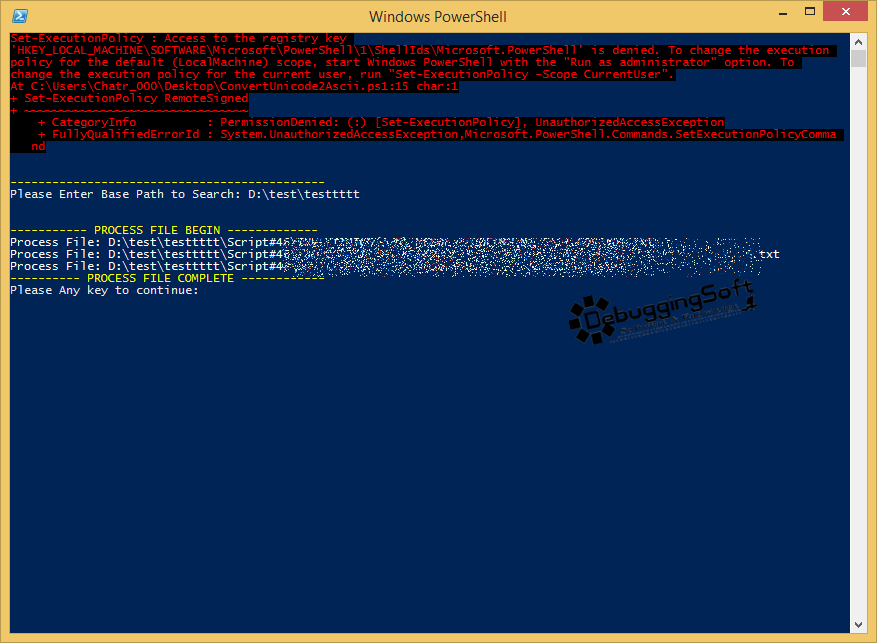
ขั้นสุดท้าย: ตรวจสอบผลลัพธ์จ้า ดังรูป
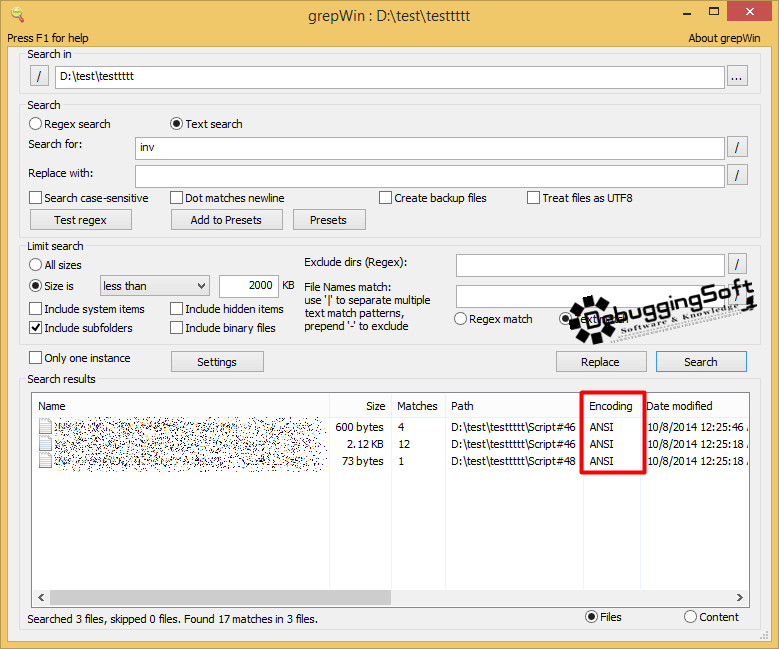
สุดท้ายแล้วสำหรับคนที่ทำงานบน Base ของ Windows สามารถที่จะแก้ปัญหาเล็กๆน้อยๆได้ โดยไม่ต้องคลิกแหลกแล้ว 55 สำหรับ Script อันนี้ สามารถนำไปโมต่อได้นะ เช่น Export ผลลัพธ์ออกไปเป็น Excel เป็นต้น
Discover more from naiwaen@DebuggingSoft
Subscribe to get the latest posts sent to your email.